


Looking for an easy way to keep track of gifts you want or plan to give? Adding gift ideas to your Amazon Wish List is a smart move.
It helps you stay organized and makes shopping faster and more fun. Whether you want to save something for yourself or share your list with friends and family, knowing how to add items quickly can make a big difference. You’ll discover simple steps to add gift ideas to your Amazon Wish List, so you never miss out on the perfect present again.
Keep reading to make your gift planning effortless and stress-free!
:max_bytes(150000):strip_icc()/001-make-and-share-amazon-wish-list-4685515-c65ed77b1e5049439a945f40acd259ee.jpg)
Credit: www.lifewire.com
Setting Up An Amazon Wish List
Setting up an Amazon Wish List is easy and helpful. It keeps your gift ideas in one place. You can share the list with friends and family. It makes gift-giving simple and fun.
This guide shows how to create and adjust your Wish List. Follow the steps to start your own list today.
Creating Your First Wish List
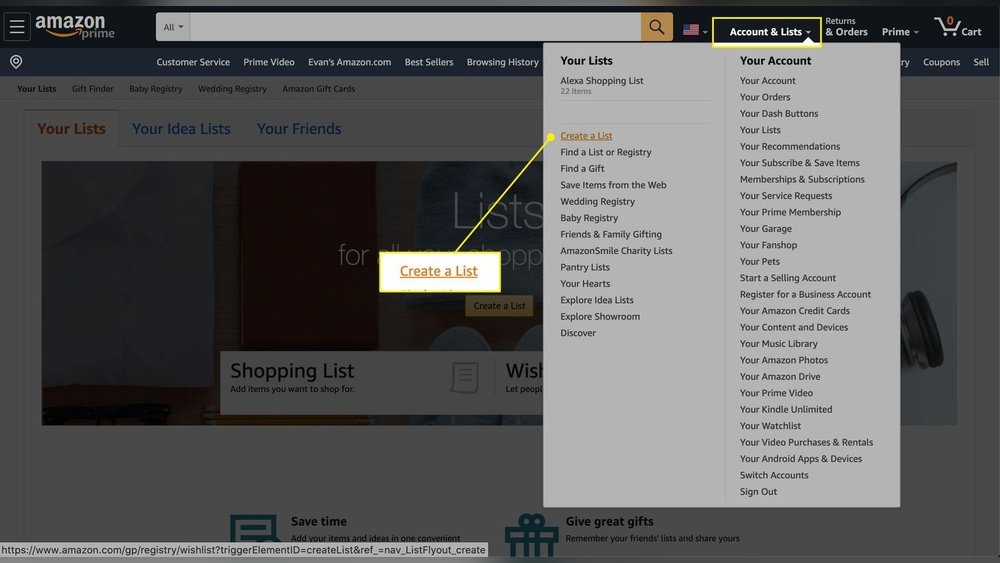
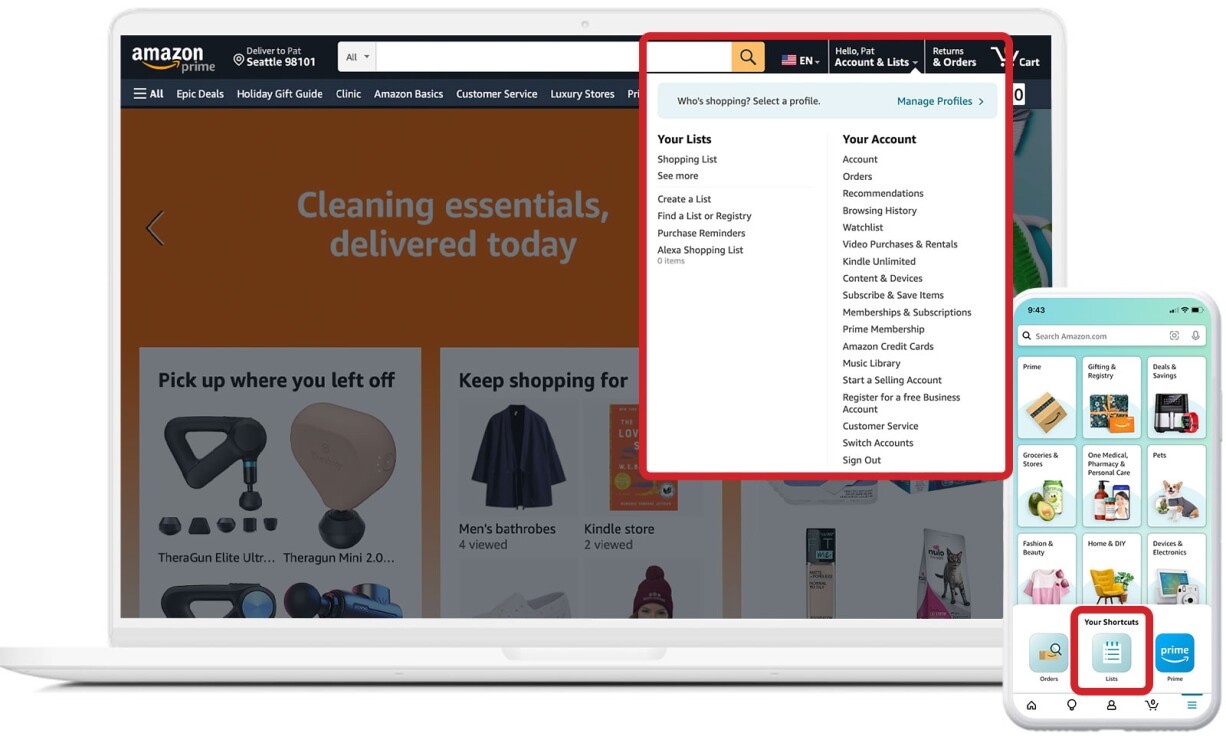
Sign in to your Amazon account. Find the “Accounts & Lists” menu at the top right. Click “Create a List” under the Wish List section. Give your list a name that you will remember. Choose whether to keep the list private or public. Click “Create List” to finish. Your Wish List is ready to add items.
Adjusting Privacy Settings
Open your Wish List by going to “Accounts & Lists.” Select the list you want to change. Click “List Settings” at the top right of the page. Find the “Privacy” option. Choose from Public, Shared, or Private. Public means anyone can see your list. Shared means only people with the link can view it. Private means only you can see the list. Save your changes to update the settings.
Finding Gift Ideas On Amazon
Finding gift ideas on Amazon can be simple and fun. The site offers many tools to help you discover items people will love. You can explore products by searching specific names or using filters. Amazon also suggests popular items based on interests and trends. These methods help you find perfect gifts quickly and easily.
Using Search And Filters
Start by typing the name of the gift or category in the search bar. This shows many related products. Use filters on the side to narrow choices by price, brand, rating, and more. Filters make the list smaller and easier to browse. You can find gifts that fit your budget and taste fast.
Exploring Recommendations
Amazon suggests gift ideas based on your browsing and purchase history. Check the “Recommended for You” or “Customers Also Bought” sections. These show items popular with other buyers. Recommendations help discover gifts you may not have thought of. They save time by showing top-rated and trending products.
Adding Items To Your Wish List
Adding items to your Amazon Wish List makes gift planning simple. You can save products you like for later. This helps friends and family find the perfect gift for you. The process is quick and easy. Here’s how to do it in different ways.
Using The Add To List Button
Amazon offers an “Add to List” button on many pages. Click this button to save an item directly to your Wish List. You can choose which list to add it to. This is the fastest way to collect gift ideas.
Adding From Product Pages
Each product page has options to add items to your list. Look for the “Add to List” or “Add to Wish List” button near the buy options. Click it and select your list. This method lets you save detailed product pages easily.
Adding From Search Results
You can add items to your Wish List right from search results. Hover over the product image or title. A small “Add to List” icon may appear. Click it to save the item without opening the product page. This saves time when browsing many items.
Managing Your Wish List Items
Managing your Amazon Wish List items helps keep your list clear and useful. It lets you update what you want and remove things you no longer need. Organizing your list makes it easier for friends and family to find the perfect gift for you.
Editing Item Details
Go to your Wish List and find the item you want to change. Click the edit button next to the item. You can update the quantity or add a comment. Change the size or color if available. Save your changes to keep your list current.
Removing Unwanted Items
Remove items you do not want anymore to keep your list tidy. Find the item and click the delete or remove option. Confirm the removal to delete the item from your list. This helps focus on gifts you truly want.
Organizing With Priorities And Notes
Set priorities to show which gifts you want most. Mark items as high, medium, or low priority. Add notes to explain why you want an item or give extra details. This helps others understand your preferences easily.
Sharing Your Wish List
Sharing your Amazon Wish List makes gift giving easier for friends and family. It helps them find the perfect gift without guessing. You can control who sees your list and keep it private or public. Sharing is simple and fast.
Generating Shareable Links
Amazon lets you create a special link for your Wish List. This link leads directly to your list of gift ideas. You can find this option in the Wish List settings. Copy the link and share it anywhere. It works on phones, tablets, and computers.
Sharing Via Email Or Social Media
Email is a common way to share your Wish List. Paste the link into a message and send it to friends or family. Social media platforms also support sharing Wish List links. Post your link on Facebook, Twitter, or other sites. Your contacts can click and see your gift ideas instantly.
Credit: www.aboutamazon.com
Using Wish Lists For Gift Giving
Using Amazon Wish Lists for gift giving makes the process smooth and clear. You can share your list with friends and family. They see exactly what you want, which helps avoid duplicate gifts. It also makes shopping easier for the giver. The wish list keeps all gift ideas in one place.
It works both ways. Givers track what they bought, so no one buys the same thing twice. Receivers get notified when someone buys a gift from their list. This keeps the surprise and excitement alive.
Tracking Purchased Gifts
Amazon lets you see which gifts are bought from your wish list. Items marked as purchased show who bought them. This helps prevent duplicates. You do not have to guess if someone already bought a gift. It saves time and effort for everyone involved.
Receiving Notifications
Amazon sends alerts when someone buys a gift from your list. You get notified by email or app notification. This way, you know a gift is on its way. It adds to the joy of receiving presents. You can prepare and thank the giver in advance.

Credit: www.amazon.com
Frequently Asked Questions
How Do I Add Gift Ideas To My Amazon Wish List?
To add gift ideas, log into your Amazon account and navigate to your Wish List. Click “Add Item” or search for the product and select “Add to List. ” This saves your gift ideas in one place for easy reference and sharing with friends.
Can I Add Items From Any Amazon Page To My Wish List?
Yes, you can add items from any Amazon product page by clicking the “Add to List” button. Choose your Wish List, and the item will be saved instantly. This makes compiling gift ideas quick and easy while browsing.
How Do I Share My Amazon Wish List With Others?
Open your Wish List and click the “Share” button. You can send the list via email or copy a shareable link. Sharing helps friends and family see your gift ideas for birthdays, holidays, or special occasions.
Is It Possible To Organize Gift Ideas On Amazon Wish List?
Yes, you can organize your Wish List by creating multiple lists or categorizing items. Use custom names like “Birthday Gifts” or “Holiday Ideas” to keep your gift ideas neat and accessible for different events.
Conclusion
Adding gift ideas to your Amazon Wish List is quick and simple. Choose items you like and click the “Add to Wish List” button. Share your list with friends and family easily. This helps others know what you want. Keep your list updated to avoid missing out.
Enjoy the convenience of having all your gift ideas in one place. Happy gifting!
When you purchase a product through Amazon links on widgetygoodness.com, we may earn a commission at no extra cost to you. This helps support the site and keep our content free. As an Amazon Associate, I earn from qualifying purchases.